What a flight ticket looks like (sample e-ticket explained)
Short answer: a flight ticket today is an e-ticket: a PDF or e-mail (often also sent by WhatsApp) showing the passenger name, a six-character booking reference, a 13-digit ticket number, the flights with dates and times, the baggage allowance and the status "Confirmed". Below is a labelled sample, followed by how to check that your own ticket is real.
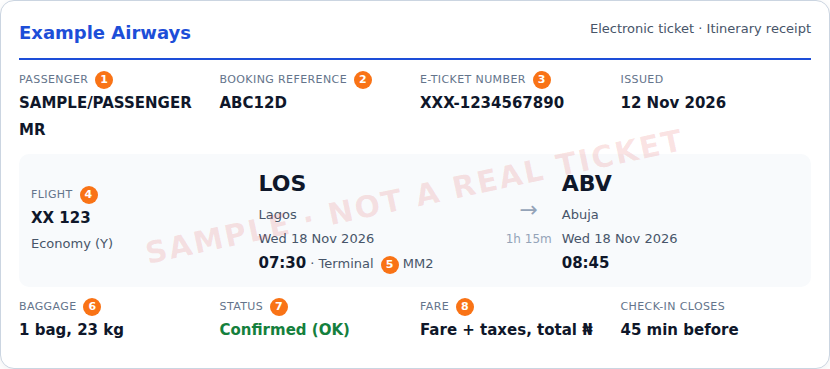
Sample e-ticket
Every part of a flight ticket explained
- Passenger name. Usually written SURNAME/FIRST NAME TITLE. It must match the ID or passport you travel with; airlines can refuse boarding if it doesn't.
- Booking reference (PNR). Six letters and numbers. You use it with your surname to check in and to manage the booking on the airline's website.
- E-ticket number. 13 digits; the first three digits identify the airline. This number shows the ticket has been paid for and issued. If there is no ticket number, you only have a reservation.
- Flight number and cabin. The airline's two-character code plus a number (for example "XX 123"), and the cabin (economy, business) with its booking-class letter.
- Airports, dates and times. Each airport has a three-letter code (LOS for Lagos, ABV for Abuja). Times are local times at each airport. The terminal is shown when the airline gives it; in Lagos check whether you fly from MM1, MM2 or the international terminal.
- Baggage allowance. How many checked bags and how many kilograms are included, for example "1PC 23KG" or "20K". Hand luggage rules are on the airline's website.
- Status. "OK" or "Confirmed" means you have a seat. "Waitlisted" or "Requested" means you don't yet.
- Fare and taxes. The receipt part shows the fare, taxes and total paid. Some tickets also show the fare rules: whether you can change or refund it, and the fees.
How to check that your flight ticket is real
- Open the airline's own website or app (type the address yourself, don't use a link from the seller) and choose "Manage booking" or "My trips".
- Enter the six-character booking reference and your surname.
- Check that the name, flights, dates and times match your ticket, and that a ticket number is shown.
- If you can't find it online, call the airline's official number with your 13-digit ticket number.
Warning signs: a "ticket" with no ticket number, a booking that doesn't show on the airline's website, or a seller who asks you to pay into a personal account. SkyKoda tickets can be checked this way on every airline's website; see how to check SkyKoda and your ticket.
E-ticket, itinerary and boarding pass
- Itinerary: a plan of your flights. On its own it is not proof of payment.
- E-ticket / itinerary receipt: proof the ticket is issued and paid, with a ticket number.
- Boarding pass: issued at check-in, with your seat and gate. You show it at security and the gate.
Common questions
What is the difference between a booking reference and a ticket number?
The booking reference (also called PNR or confirmation code) is six letters and numbers and identifies your reservation. The e-ticket number is 13 digits and shows the airline has been paid and issued your ticket. A booking reference without a ticket number is only a reservation, not a ticket.
How do I know if my flight ticket is real?
Go to the airline's own website, open "Manage booking" and enter the six-character booking reference and your surname. If your flight, name and date show up, the booking is real. You can also call the airline with your 13-digit ticket number.
Is an e-ticket the same as a boarding pass?
No. The e-ticket proves you paid for the flight. The boarding pass is issued at check-in (online or at the airport counter) and is what you show at the gate.
Do I need to print my flight ticket?
Usually not: most airlines accept the e-ticket on your phone and only need your booking reference or ID at check-in. Some immigration officers and visa offices ask for a printed itinerary, so a printout can help for international trips.
What should I do if my name is wrong on the ticket?
Contact the airline or the agent who sold the ticket straight away. Small spelling corrections are often possible; a change of passenger usually is not. Always enter names exactly as on the ID or passport you will travel with.
Where do I find my SkyKoda ticket?
It is sent by e-mail and WhatsApp once the booking is paid in full. You can also open it any time in Manage booking with your booking number.
Ready to fly? Compare every airline we can sell, pay in full or from 25% with FlexPay, ₦0 service charge.
More travel guides
- How much is a flight ticket in Nigeria?
- Airports in Nigeria by state
- Travel now, pay later in Nigeria: every way to pay for a flight in instalments
- UK visitor visa from Nigeria: fees, documents and how to apply
- Schengen visa from Nigeria: which embassy, fees and documents
- US visa from Nigeria in 2026: the suspension, bond, fees and interviews
- Canada visitor visa from Nigeria: fees, processing time and biometrics
- Dubai visa for Nigerians: current status, fees and transit rules
- Visa-free countries for Nigerian passport holders
- VFS Global in Nigeria: centres, addresses and countries
- Nigerian international passport: fees, requirements and renewal
- Public holidays in Nigeria 2026 and 2027